Preply — language tutors
Personally, I use Preply for language learning. If you want to try an online tutor, our link includes 70% off the trial lesson. We earn a small bonus if you go on to paid lessons - it helps to keep the site running.
Example
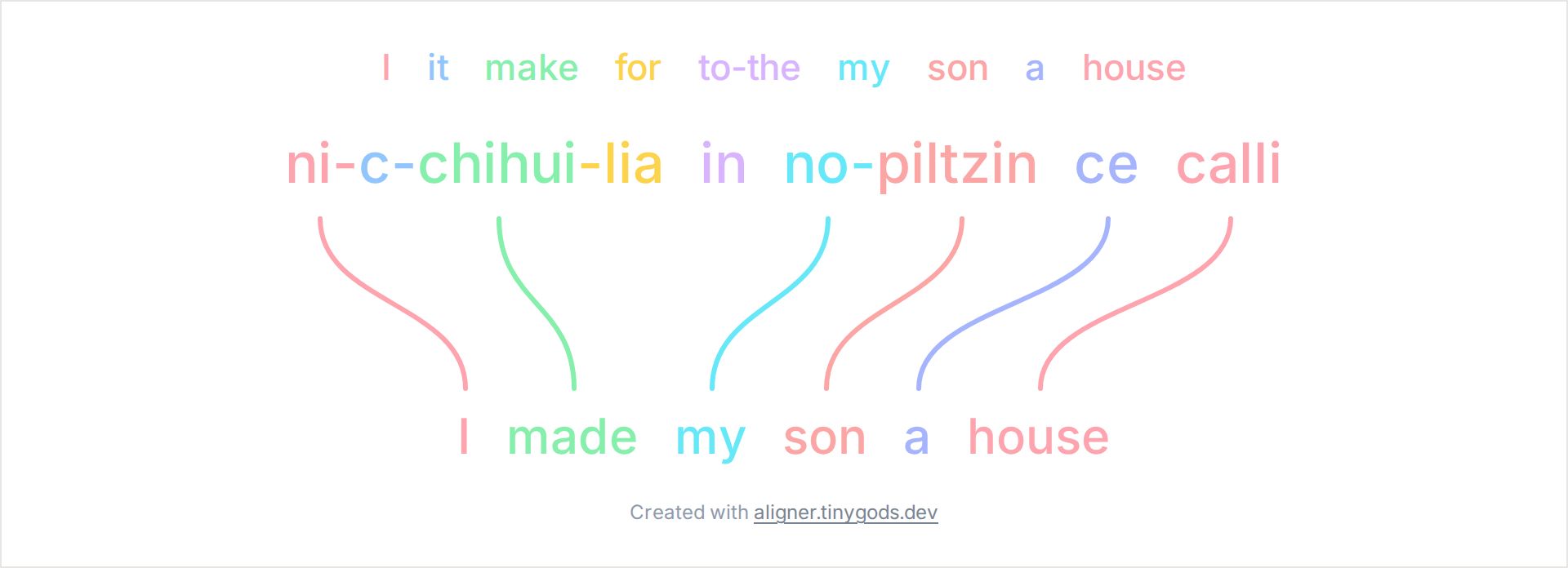
Example layout based on an example in the Wikipedia article Interlinear gloss (illustrative; Leipzig-style conventions).
Classical Nahuatl builds a verb from several stacked morphemes, and this example lines each one up against English “I made my son a house”. The clause ni-c-chihui-lia in no-piltzin ce calli reads piece by piece, so you can see where one Nahuatl word holds what English spreads across a whole phrase.
The single verb word ni-c-chihui-lia carries the subject, the object, the action, and a beneficiary:
The rest of the clause, no-piltzin (my son) and ce calli (a house), supplies the people and things the verb points to. no- is a possessive prefix meaning “my”.
English needs a separate word for the subject, the verb, and each object, while Nahuatl folds the subject, object, and a beneficiary into one verb. So a single Nahuatl box links to several English words, and the morpheme order inside the verb does not follow English word order. The vertical layout keeps each morpheme directly above its gloss.
Each morpheme is split with a hyphen and labeled either with a plain English word or with a Leipzig category tag such as APPL for the applicative. A period inside a tag, as in 1SG.SUBJ, joins several grammatical meanings that share one form.
For the category labels:
Open the example, set the morpheme boundary character under Settings → Tokens, and add a free-translation line if you want a smoother English rendering below the gloss. Export the diagram as PNG, SVG, or PDF for a fieldwork handout or a typology class.
Related examples:
Personally, I use Preply for language learning. If you want to try an online tutor, our link includes 70% off the trial lesson. We earn a small bonus if you go on to paid lessons - it helps to keep the site running.