Preply — language tutors
Personally, I use Preply for language learning. If you want to try an online tutor, our link includes 70% off the trial lesson. We earn a small bonus if you go on to paid lessons - it helps to keep the site running.
Example
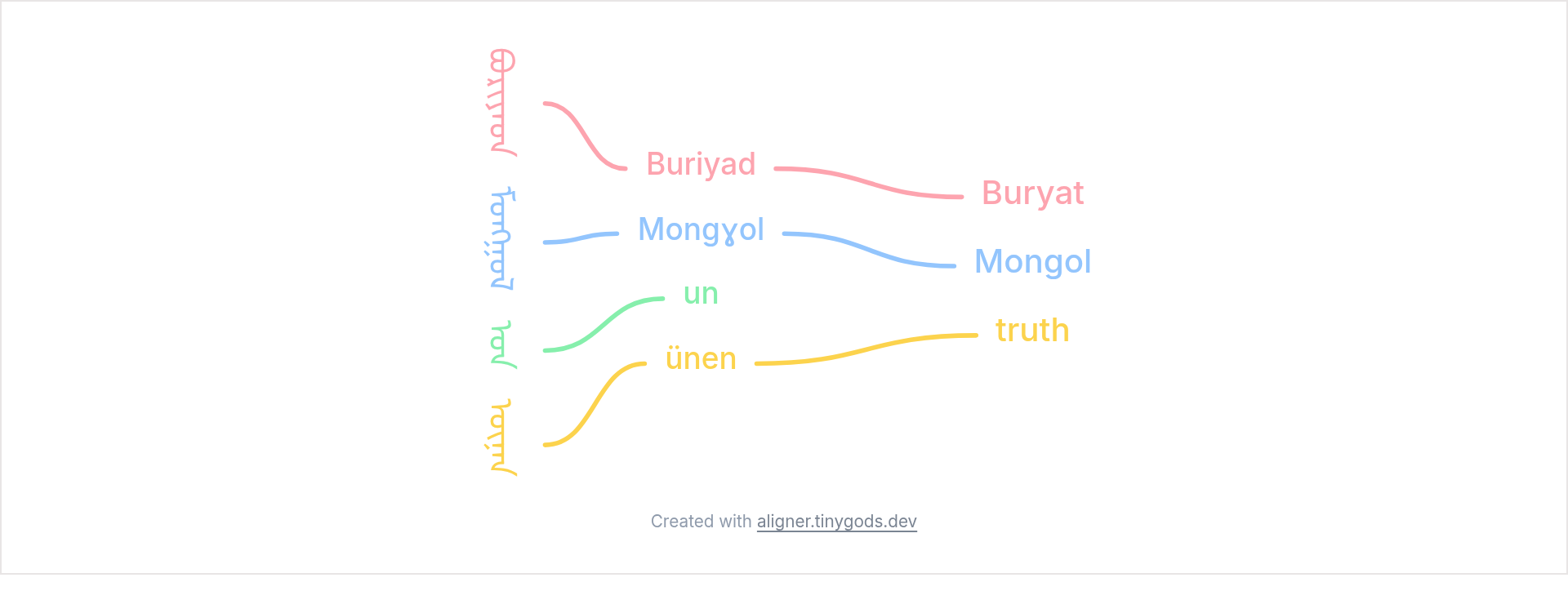
Example layout based on an example in the Wikipedia article Mongolian script (Wikipedia) (illustrative; Leipzig-style conventions).
The Mongolian column carries the masthead of Buriyad Mongɣol-un ünen, a newspaper published from 1925. Beside it sits a Latin transliteration, and beside that an English translation. Reading across the columns takes you from script to sound to meaning.
Mongolian columns progress left to right, so the script line comes first and the translation follows to its right. Japanese and Chinese run the other way. The tool has no separate direction setting for this: the order of your lines decides which column lands on which side.
Each Mongolian word, its transliteration, and its English:
Mongolian letters join into a running vertical stem, so they cannot be set as separate stacked characters the way Japanese kanji and kana are. Fonts for the script store the glyphs rotated a quarter turn, and vertical layout rotates the whole line back. In the tool this is the sideways setting on the line, chosen instead of stacking.
The same setting suits a Latin line that you want to read like the spine of a book, inside an otherwise vertical diagram.
Open the example, then switch Direction to Columns in the Style tab. Open the Mongolian line's own settings and set its Text setting to sideways. The transliteration and translation lines stay upright. Adding a transliteration tier is worth it for any script your readers cannot sound out.
Related:
Personally, I use Preply for language learning. If you want to try an online tutor, our link includes 70% off the trial lesson. We earn a small bonus if you go on to paid lessons - it helps to keep the site running.